Angular Universal Movie Search – Demo
This is the second part to the Angular 10 Movie Search (ssr ngUniversal), TMDB API tutorial. This tutorial will focus on adding some interactive features to the server side rendered app!
Display Movie Details
- Show movie rating on hover.
- Create a trailer link to open a dialog window preview.
- Generate a dialog (modal) component with
angular cli.
Let’s show some info about the movie when we hover over the movie image. The search payload provides a movie rating score 0 – 10. The rating (vote_average) can be converted to an array to show the rating as star icons equal to the length of the array.
The payload is the data sent back after you make a search request to the api. You will get a max of 20 results per response. The smaller the payload the quicker the data is rendered in the ui. This is an example of the first object of an Observable sent back by the api.
{
  "popularity":24.087,
  "id":670466,
  "video":false,
  "vote_count":29,
  "vote_average":6.8,
  "title":"My Valentine",
  "release_date":"2020-02-07",
  "original_language":"en",
  "original_title":"My Valentine",
  "genre_ids":[53,27],
  "backdrop_path":"/jNN5s79gjy4D3sJNxjQvymXPs9d.jpg",
  "adult":false,
  "overview":"A pop singer's artistic identity is stolen by her ex-boyfriend/manager and shamelessly pasted onto his new girlfriend/protégé. Locked together late one night in a concert venue, the three reconcile emotional abuses of the past . . . until things turn violent.",
  "poster_path":"/mkRShxUNjeC8wzhUEJoFUUZ6gS8.jpg"
}
In the first part of this tutorial I used the poster_path to display the movie image and now I can use the vote_average to show the rating of the movie. I created a function inside the component’s controller to convert the rating to an array that can then represent the value of the vote_average rounded to a whole number and use gold stars to represent the rating when I hover over the movie image.
<span class="star-rating" *ngFor="let star of rating(item)">
  <span>☆</span>
</span>
//home.component.ts line 53

public rating(movie) {
  let rating = Array(Math.round(movie.vote_average)).fill(0);
  movie.rating = rating;
  return rating;
}
Then Style the content for the returned value of the rating so that we only see the stars on hover. Full SCSS file for the Dialog Component
//components/dialog/dialog.component.scss

.item .bg .info {
  background-color: rgba(0, 0, 0, 0.0);
  position: absolute;
  bottom: 0;
  color: #fff;
  font-size: 9px;
  text-transform: uppercase;
  width: 100%;
  transition: linear .3s;

  p {
    opacity: 0;
    transition: linear .3s;
  }

  .star-rating {
    color: transparent;
    span:before {
      content: "\2605";
      position: absolute;
      color: gold;
    }
  }
}

.item .bg .item:hover {
  .info {
    background-color: rgba(0, 0, 0, 0.5);
    p {
      color: #fff;
      opacity: 1;
      font-size: 14px;
    }
  }
}
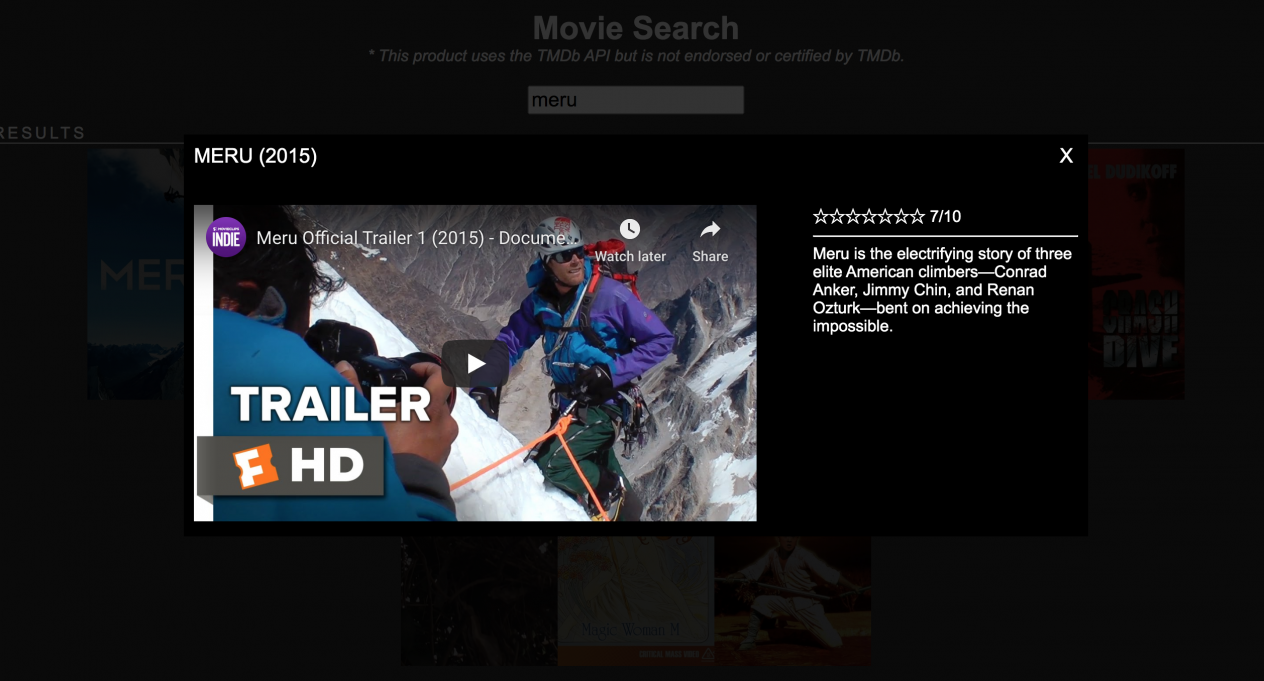
Next I am going to add a link that will send another api request for a movie trailer (preview) and then open a dialog (pop-up window) to display the trailer with the overview (description) of the movie.
Create a dialog component
When I fetch the movie trailer info from the api I want to embed the media link inside an html <iframe>. I want to add a “Trailer” link that will pop open a window to show the trailer when clicked. Using angular cli I will generate a new dialog component. In the terminal type ng g c components/dialog --module=app.module.ts. This command will add the component to app.module.ts automatically.
To create a pop-up window from scratch I need to use a little css and some angular tricks to help me add a special class when the “Trailer” link is clicked. The dialog component uses a boolean to add an active class to a div to show a dark overlay background with a pop-up window positioned in the center of the overlay. Using an angular directive [ngClass] if isOpen boolean is true add active class to the overlay id. <div id="overlay" [ngClass]="{'active': isOpen}"> This allows me to hide the overlay div until it’s active, when I click the trailer link and make isOpen equal true. All I need to do is add some Inputs to the app-dialog component.
<!-- home.component.html line 1 -->

<app-dialog
  [isOpen]="isOpen"
  [selectedMovie]="selectedMovie"
  [trailerUrl]="trailerUrl"
  (close)="isOpen = false"></app-dialog>
//dialog.component.ts

import { Component, Input, Output, EventEmitter } from '@angular/core';

@Component({
  selector: 'app-dialog',
  templateUrl: './dialog.component.html',
  styleUrls: ['./dialog.component.scss']
})

export class DialogComponent {
  @Input('selectedMovie')
  public selectedMovie      :any;
  @Input('trailerUrl')
  public trailerUrl         :any;
  @Input('isOpen')
  public isOpen             :boolean;
  @Output() close = new EventEmitter();

  constructor() { }

  public closeModal() {
    this.isOpen = false;
    this.selectedMovie = null;
    this.trailerUrl = null;
    this.close.emit();
  }

}
I am using Input to inject data from the home.component on click by calling a function and I am using Output to emit a function when the dialog is closed. The dialog can be closed by clicking on the X in the top right or by clicking on the overlay. The closeModal() function will remove the active class, reset all the values and emit a function to reset isOpen in the home.component.
<!-- dialog.component.html -->

<div id="overlay" [ngClass]="{'active': isOpen}" (click)="closeModal()">
  <div class="modal" (click)="$event.stopPropagation()">
    <div class="modal-header">
      <span class="header-title" *ngIf="selectedMovie != null">
        {{selectedMovie?.title ? selectedMovie?.title : selectedMovie?.name}}
        ({{selectedMovie?.release_date ? (selectedMovie?.release_date | date: 'y') : selectedMovie?.first_air_date | date: 'y'}})
      </span>
      <span class="right" (click)="closeModal()">X</span>
    </div>
    <div class="content">
      <div id="top" class="row">
        <div *ngIf="trailerUrl != null" class="col-trailer">
          <iframe [src]="trailerUrl" width="560" height="315" frameborder="0" allowfullscreen></iframe>
        </div>
        <div class="col-overview">
          <span class="star-rating" *ngFor="let star of selectedMovie?.rating">
            <span>☆</span>
          </span>
          <span>
            {{selectedMovie?.rating?.length}}/10
          </span>
          <br>
          <hr>
          <span>{{selectedMovie?.overview}} </span> <br>
        </div>
      </div>
    </div>
  </div>
</div>
Request Trailer from the API
- Add a new endpoint to request movie trailers by id.
- Create a youtube
trailerUrland display in a<iframe>.
The selectedMovie is passed from the home.component when the movie link is clicked but before the dialog is opened I need to fetch the movie trailer from the api. I added a new api call to the api.ts file.
//home.component.ts

//line 17
 public isOpen: boolean = false;
 public selectedMovie: any;
 public trailerUrl: any;

//line 37
 public openTrailer(movie) {
    this.selectedMovie = movie;

    this.dataService.trailer(movie.id).subscribe(res => {

      if (res[0] != null) {
        if (res[0].site === 'YouTube') {
          this.trailerUrl = this.sanitizer.bypassSecurityTrustResourceUrl(
            `https://www.youtube.com/embed/${res[0].key}`
          );
          this.isOpen = true;
        }
      }
    })
  }
From here the data.service will work as a middle manager to talk with the server / api and send the response back to the client (front-end). The first index in the response will usually be a link to youtube where just about all movie trailers reside so I am using a condition to specifically only use youtube trailers and if not the dialog won’t open. I had to import DomSanitizer to bypass security. Add this to home.component.ts import { DomSanitizer } from '@angular/platform-browser'; and add it to constructor private sanitizer: DomSanitizer. For fun you can add to this condition if you would like to let the trailer open from another video source.
//data.service.ts line 24

trailer(item) {
  let searchterm = `query=${item}`;
  try {
    this.result = this.http.post('/trailer', searchterm, {headers});
    return this.result;
  } catch (e) {
    console.log(e, 'error')
  }
}
I am using try catch to handle an error but there are many ways to handle an error in angular. This was just for simplicity on my end.
//server.ts line 42

server.post('/trailer', async (req, res) => {
    let searchquery = req.body.query;
    let encsearchquery = encodeURIComponent(searchquery);
    const data =  await api.data.trailer(encsearchquery, apiKey);
    res.status(200).json(data);
})
I am using a typescript async function that will await for the api to give us the payload (response) before completing the post to avoid a server error.
//api/api.ts

//line 4
let trailerInfo = [];

//line 19
methods.trailer = async (id: string, apiKey: string) => {
  let apiUrl = `https://api.themoviedb.org/3/movie/${id}/videos?api_key=${apiKey}&language=en-US`;
  let trailerPromise = new Promise((resolve, reject) => {
    request(apiUrl, {}, function(err, res, body) {
      let data = JSON.parse(body);
      trailerInfo = data['results'];
      resolve();
    });
  });

  let result = await trailerPromise;
  return trailerInfo;
};
I am using this TMDb endpoint https://api.themoviedb.org/3/movie/${id}/videos?api_key=${apiKey}&language=en-US to get the movie trailer by movie id. The id and apikey are passed into the endpoint using typescript brackets and backticks which is a new way to add dynamic values with js and it looks much nicer than using a + to concatenate values.
If the data meets the youtube condition the dialog pop-up is opened and the data will show inside the html and the angular interpolated strings {{selectedMovie.title}}, the double brackets processes the data in the html dynamically.
Something that is not always talked about with projects like this one is that it wouldn’t take much time to convert this into a completely different project. You could easily change the endpoints in the api.ts file to communicate with a different api and get different data to show in the ui. Of course you would need to change some of the variables naming conventions so that the code makes sense but this project can be recycled with something else that you might be more interested in. See it as a template already set up with a simple backend server and api file to handle any data that you would like to fetch and send back to the front-end for display. Change the header title in home.html to something like Job Search and connect to a job listing api that can fetch jobs by keywords for example. Once you get started anything is possible. Thank you for coding with me. Good luck. Full source code
Side note: I just found out right this minute there is a html5 dialog tag <dialog open>This is an open dialog window</dialog> but it didn’t work for me in chrome. It might be a little too new and lacking browser support but perhaps you creative devs out there can find a way to use that instead of my “do it from scratch” approach.