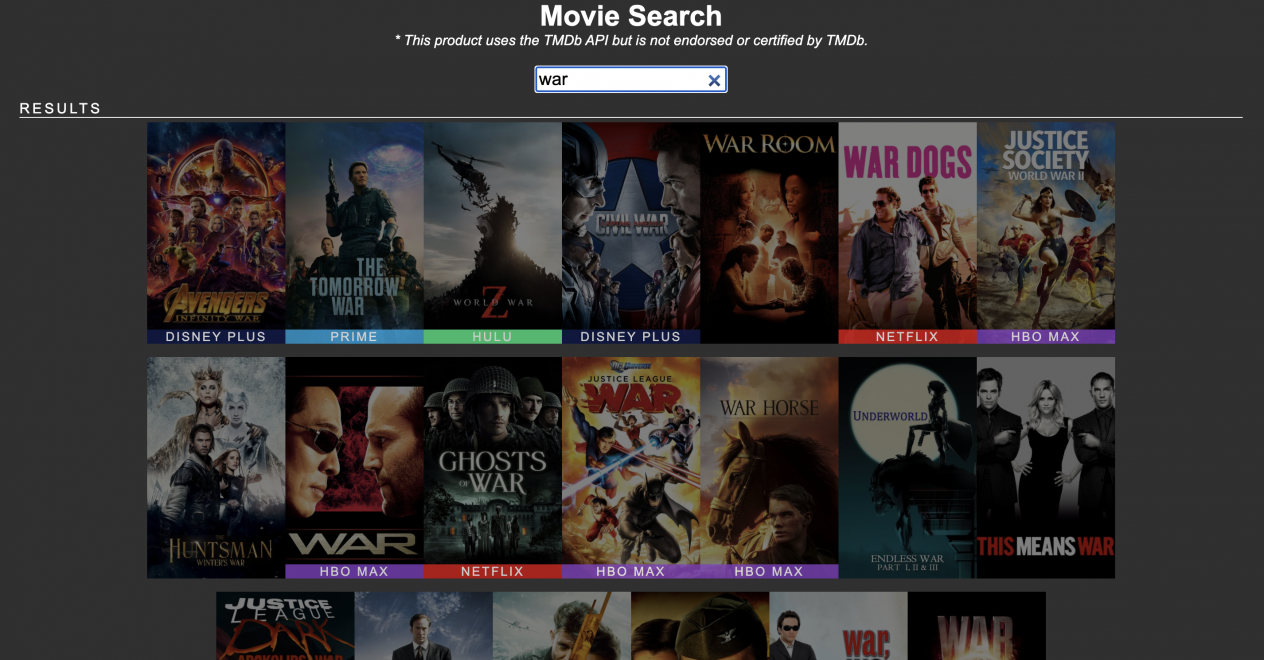
Fetch Movie Streaming Services and Credits
The Movie DB API recently added a new endpoint that will fetch a movie’s streaming provider by using a movie’s id. I also added another endpoint to fetch the cast of the movies in the search payload. I updated the api.ts file to handle these new requests.
After getting the search results I use the rxjs forkJoin method and map to make multiple requests for providers for each movie by id. The provider data is pushed to the mvProvider array and then that is added to the searchInfo object which is then sent back to the client with movie results array, providers array and credits array.
Async and Await
Depending on the amount of search results a single search request could generate up to 30 api requests before the data is resolved and sent to the client. I created a sleep function to await all the requests to finish to avoid a resolve sending incomplete data back to the front-end. It’s not the best way to handle this but it works. Using async and await is important to make sure all the data being fetched completes before the promise is resolved.
//api.ts
let request = require('request')
let methods: any = {}
let searchInfo = [
  {
    results: [],
    providers: [],
    credits: []
  }
]
import { forkJoin } from 'rxjs'

methods.search = async (term: string, apiKey: string) => {
  let type = 'movie'
  let searchQuery = `https://api.themoviedb.org/3/search/${type}?api_key=${apiKey}&language=en-US&page=1&include_adult=false&query=${term}`

  let searchPromise = new Promise((resolve, reject) => {
    request(searchQuery, {}, function(err, res, body) {

      let mvProviders = []
      let mvCredits = []
      const sleep = (ms) => new Promise(resolve => setTimeout(resolve, ms))
      let data = JSON.parse(body)
      searchInfo[0]['results'] = data['results']

      const providers = async() => {
        forkJoin(
          data['results'].map( m =>
            request(
              `https://api.themoviedb.org/3/${type}/${m.id}/watch/providers?api_key=${apiKey}`,
              {},
              async function(err, res, body) {
                let data = await JSON.parse(body);
                mvProviders.push(data);
                if (mvProviders.length > 1) {
                  return searchInfo[0]['providers'] = mvProviders;
                }
              }
            )
          )
        )
      }

      const credits = async() => {
        await providers()

        forkJoin(
          data['results'].map( m =>
            request(
              `https://api.themoviedb.org/3/${type}/${m.id}/credits?api_key=${apiKey}&language=en-US`,
              {},
              async function(err, res, body) {
                let data = await JSON.parse(body);
                mvCredits.push(data);
                if (mvCredits.length > 1) {
                  searchInfo[0]['credits'] = mvCredits;
                }
              }
            )
          )
        );
        await sleep(1500);
        resolve('done');
      }
      credits()
    });
  });
  let result = await searchPromise;
  return searchInfo;
}

export const api = {data: methods};
Refactor Search Using Angular event binding
I had to refactor the search method from the previous tutorial because it was blocking me from adding more related movie data to the array before presenting it in the home.component.html file.
In the html file I can use Angular event binding (input) to listen for an event change and call a function passing in the event which contains the search text.
I can pass the search text to the api.ts file append it to the api endpoint and request the data.
If the req (request) is successful the payload res (response) is sent back to the client (front-end) and I can format the data with logic inside the home.component.ts (controller). I created an array called results to define the formatted data to so that the actors and streaming service will show in the UI.
<!-- home.component.html -->

<div class="row">
  <input (input)="doSearch($event)" type="search" class="form-control" placeholder="search">
  <span class="search-title">{{ results?.length ? 'Results' : 'Search' }}</span>
</div>
// home.component.ts
...

ngOnInit(): void {
  }

  public doSearch(e) {

    if (e.target.value.length > 2) {
      this.dataService.search(e.target.value).pipe(
        debounceTime(400)).subscribe(res => {
          this.format(res)
      })
    }

    if (e.target.value.length == 0) {
      this.results = []
      this.selectedMovie = null
    }

  }

  public format(data) {
    this.util.relatedInfo(data[0].results, data[0].providers, 'providers', 'movies')
    this.util.relatedInfo(data[0].results, data[0].credits, 'credits', 'movies')
    this.loading = false
    this.results = data[0].results
    console.log(this.results, 'res')
  }

  ...
Go to full home.component.ts file on GitHub.
Format Data
I need to format the data to match providers and credits with movies they belong to by id. I created a utility service to handle the formatting. By using the command ng g s services/util I can generate a service file with Angular cli. The functions in a service can be used by all components of an angular app by importing the service into the component controller. Now I can call the relatedInfo function in home.component.ts.
//util.service.ts
public relatedInfo(items, extras, type: string, itemType: string) {
    for (let item of items) {
      for (let e of extras) {

        if (item.id === e.id) {

          if (type === 'credits') {

            item.credits = e;
            item.type = itemType;
            if (e.cast[0] != null) {
              item.credit1 = e.cast[0]['name'];
              item.credit1Pic = e.cast[0]['profile_path'];
              item.credit1Char = e.cast[0]['character'];
            }

            if (e.cast[1] != null) {
              item.credit2 = e.cast[1]['name'];
              item.credit2Pic = e.cast[1]['profile_path'];
              item.credit2Char = e.cast[1]['character'];
            }
          }

          if (type === 'providers') {
            item.provider = e['results'].US != null ? e['results'].US : 'unknown';
          }

        }
      }
    }
    return items;
}
Style Credits of The Movies
I need to show the credits in the search view and the trailer view. Since the html is already set up for the results array there are a few adjustments I need to make in home.component.html and dialog.component.html to show the movie’s acting credits.
<!-- home.component.html line 21 -->
...

 <span class="info">
  <p>
    <span *ngIf="item?.credit1">Cast: {{item?.credit1}}, {{item?.credit2}} <br></span>
    <span class="star-rating" *ngFor="let star of rating(item)"> <span>☆</span> </span><br>
    <span class="trailer-link" (click)="openTrailer(item)">Trailer</span>
  </p>
 </span>

...
<!-- dialog.component.html line 24 --> ... <span>{{selectedMovie?.overview}} </span> <br> <span class="row cast" *ngIf="selectedMovie?.credits"> <span class="col-cast" *ngFor="let actor of selectedMovie?.credits?.cast; let i = index"> <span [ngClass]="{'dn': i > 3 || actor?.profile_path == null, 'cast-item': i <= 3 && actor?.profile_path != null}"> <img src="https://image.tmdb.org/t/p/w276_and_h350_face{{actor?.profile_path}}" alt="image of {{actor?.name}}"> <br> {{actor?.name}} <br> ({{actor?.character}}) </span> </span> </span> ...
I added some new css styles to handle this new data.
/* dialog.component.scss line 111 */
...

.row.cast {
  margin-top: 20px;
  .col-cast {
    flex: 0 0 50%;
    text-align: left;
    font-size: 10px;

    img {
      width: 30%;
      border: 1px solid #fff;
      border-radius: 8px;
    }
    .cast-item {
      padding-bottom: 5px;
      display: block;
    }
    .dn {
      display: none;
    }
  }
}

...
Full dialog.component.scss here on GitHub.
Display Streaming Provider
To display the streaming service of each movie in the returned array of movies I use a function called getProvider. This function will take one argument and check item.provider is not string to fit in the display. Some provider titles are too large for the ui and need to be changed using if / else conditonals.
<!-- home.component.html line 28 -->

<span *ngIf="item?.provider != null" class="{{getProvider(item?.provider)}} probar">
  {{getProvider(item?.provider)}}
</span>
// home.component.ts line 75
...

public getProvider(pro) {
  try {
    if (pro === 'unknown') {
      return ''
    } else if (pro['flatrate'] != null) {
      if (pro.flatrate[0].provider_name === 'Amazon Prime Video') {
        return 'prime'
      } else if (pro.flatrate[0].provider_name.toUpperCase() === 'IMDB TV AMAZON CHANNEL') {
        return 'imdb tv'
      } else if (pro.flatrate[0].provider_name.toUpperCase() === 'APPLE TV PLUS') {
        return 'apple tv'
      } else {
        return pro.flatrate[0].provider_name.toLowerCase()
      }
    } else if (pro['buy'] != null) {
      return ''
    } else if (pro['rent'] != null) {
      return ''
    } else {
      return ''
    }
  } catch(e) {
    console.log(e, 'error')
  }
}

...
Now using the probar class I can style the streaming service provider. I can also use the provider name in the html class by using angular interpolation curly brackets to add a dynamic background color to the probar style.
/* styles.scss line 58 */
...

.probar {
  position: absolute;
  bottom: 0;
  width: 100%;
  text-align: center;
  font-size: 14px;
  font-weight: 300;
  letter-spacing: 2px;
  opacity: 0.8;
  color: #fff;
  text-transform: uppercase;
  background: #555;
}

.netflix {
  background: #e00713;
}

.hbo {
  background: #8440C1;
}

.prime {
  background: #00A3DB;
}

.hulu {
  background:  #1DE883;
}

.disney {
  background:  #111D4E;
}

.apple {
  background:  #000;
}

...
Full Screen Trailer Modal
I decide to make the trailer modal the full width of the screen and add a background image of the selected movie. I updated dialog.component.html by using the Angular [ngStyle] directive to handle the movie background image. I added a class named full to the modal class then I added new styles to the active modal.full class.
<!-- dialog.component.html line 11 -->
...

<div id="top" class="row" *ngIf="isOpen" [ngStyle]="{'background': 'linear-gradient(-225deg, rgba(0,0,0,0.6) 50%, rgba(0,0,0,0.6) 80%), url(https://image.tmdb.org/t/p/w533_and_h300_bestv2/'+ selectedMovie?.backdrop_path +')' }">

...
/* dialog.component.scss line 133 */
...

 .modal.full{
    height: 100%;
    min-width: 100%;
    #top {
      height: 500px;
      background-size: cover!important;
      background-repeat: no-repeat!important;
    }

    .row .col {
      flex: 0 0 11%;
    }

    .content {
      .col-trailer {
        align-self: center;
        text-align: center;
      }
      .col-overview {
        align-self: center;
      }
    }
  }

  ...
This is a cool feature that I use often to find where a movie is streaming and the search responds quickly, faster than a google search I think.
A fun challenge for advanced developers out there reading this would be if you could refactor the api.ts code. I am using nested Promises to wait for a resolve before sending the movie data back to the client. The reference to this is in the Async and Await sub section of this article. However I don’t like the way I had to use a sleep await timer function so that the data would wait for the credit and provider data to reslolve before the movie data got sent back to the client. I shouldn’t have to use the sleep function that was just a patch to help me out. The problem was I created too many scopes and the resolves were not working the way that I wanted them to. If someone can get the resolves to work without using the sleep timer function I would be very impressed. Thank you for reading!